
Code Examples
Compatibility Runner Client 3.x exposes asynchronous APIs and is the recommended client for Runner 2.x servers.
- Working with Images and starting Sessions based on Images
- Simple session creation based on Runner installation
- Create and execute a test plan
- Editing step and test plan settings
- Load and execute a test plan
- Receiving results, logs and events from a Session
- How to work with component settings
- Configuring a Runner for default execution and using stored test plans on the Runner
- Copy, paste, undo, and redo test steps
- Working with UserInputs
- Debugging: Breakpoints, pause, and jump-to-step
- Session watchdog configuration
- Test plan validation errors
- Runner status and health monitoring
- Moving and deleting test steps
- Querying and searching session logs
Image creation
For this example we have a Runner started which has the ID: HKZ6QN3

using System;
using System.Collections.Generic;
using System.Threading.Tasks;
using NATS.Client.Core;
using OpenTap.Runner.Client;

await using INatsConnection connection = new NatsConnection(new NatsOpts { Url = RunnerClient.DefaultUrl });
await connection.ConnectAsync();
RunnerClient runner = new RunnerClient(connection);

Image image = new Image
{
    Packages = new List<PackageSpecifier>
    {
        new PackageSpecifier { Name = "Demonstration" },
        new PackageSpecifier { Name = "HTTP", Version = "1.0.0" },

        // We can even specify a different runner version for the session
        new PackageSpecifier { Name = "Runner", Version = "2" }
    },
    Repositories = new List<string> { "https://packages.opentap.io" }
};

Image? resolvedImage = await runner.ResolveImageAsync(new List<Image> { image });
if (resolvedImage is null)
    throw new InvalidOperationException("Image resolution failed.");

SessionClient newSession = await runner.StartImageSessionAsync(resolvedImage);

// Use the session for test automation

await runner.ShutdownSessionAsync(newSession.Id);
In this example, we successfully resolved an image, started and stopped a session based on the image. This can be verified in the Runner logs:

Session creation
Although the Image approach offers flexibility, some use-cases can be kept simple by just using a Runner Session based on the Runner installation.
using NATS.Client.Core;
using OpenTap.Runner.Client;

await using INatsConnection connection = new NatsConnection(new NatsOpts { Url = RunnerClient.DefaultUrl });
await connection.ConnectAsync();
RunnerClient runner = new RunnerClient(connection);

SessionClient newSession = await runner.StartSessionAsync();

// Use the session for test automation. Plugins available in this session
// come from the packages installed in the Runner.

await runner.ShutdownSessionAsync(newSession.Id);
Create and Run Test Plan
In this example, we use the simple session from the Session creation example above, but before shutting down the session, we setup and run a simple test plan.
using System;
using System.Collections.Generic;
using System.Linq;
using System.Threading.Tasks;
using NATS.Client.Core;
using OpenTap.Runner.Client;

await using INatsConnection connection = new NatsConnection(new NatsOpts { Url = RunnerClient.DefaultUrl });
await connection.ConnectAsync();
RunnerClient runner = new RunnerClient(connection);
SessionClient newSession = await runner.StartSessionAsync();

List<TestStepType> types = await newSession.GetStepTypesAsync();
TestPlan plan = await newSession.GetTestPlanAsync(null);
plan.ChildTestSteps.Clear();
plan.ChildTestSteps.Add(types.First(step => step.TypeName.Contains("Delay")));
plan = await newSession.SetTestPlanAsync(plan);

Settings delayStepSettings = await newSession.GetSettingsAsync(plan.ChildTestSteps[0].Id);
if (delayStepSettings.FirstOrDefault(s => s.PropertyName == "DelaySecs") is TextBoxControl textBox)
    textBox.StringValue = "3 s";
delayStepSettings = await newSession.SetSettingsAsync(plan.ChildTestSteps[0].Id, delayStepSettings);

RunStatus status = await newSession.RunTestPlanAsync(new List<Parameter>());
while (status.SessionState != SessionState.Idle)
{
    await Task.Delay(1000);
    status = await newSession.GetStatusAsync();
}

Console.WriteLine(status.Verdict);

await runner.ShutdownSessionAsync(newSession.Id);
In this example, we retrieved the available test step types using GetStepTypes and chose a Delay step and inserted into the Test Plan using SetTestPlan.
Afterwards, we retrieved the Delay step settings and modified the Time Delay to be 3 s.
Lastly, we ran the Test Plan and continually asked for the status until the SessionState turned back to Idle. The Verdict of the Test Plan was logged and the output of this program would be NotSet.
Editing Step and TestPlan Settings
In this example, we add two steps to a test plan and demonstrate how to read and modify settings on both steps and the plan itself.
using System;
using System.Collections.Generic;
using System.Linq;
using System.Threading.Tasks;
using NATS.Client.Core;
using OpenTap.Runner.Client;

await using INatsConnection connection = new NatsConnection(new NatsOpts { Url = RunnerClient.DefaultUrl });
await connection.ConnectAsync();
RunnerClient runner = new RunnerClient(connection);
SessionClient session = await runner.StartSessionAsync();

try
{
    // Add a DelayStep and a LogStep to the test plan
    List<TestStepType> types = await session.GetStepTypesAsync();
    TestStepType delayType = types.First(step => step.TypeName.Contains("Delay"));
    TestStepType logType = types.First(step => step.TypeName.Contains("LogStep"));

    TestPlan plan = await session.GetTestPlanAsync(null);
    plan.ChildTestSteps.Clear();
    plan.ChildTestSteps.Add(delayType);
    plan.ChildTestSteps.Add(logType);
    plan = await session.SetTestPlanAsync(plan);

    Guid delayStepId = plan.ChildTestSteps[0].Id;
    Guid logStepId = plan.ChildTestSteps[1].Id;

    // Read and modify a TextBoxControl on the Delay step
    Settings delaySettings = await session.GetSettingsAsync(delayStepId);
    if (delaySettings.FirstOrDefault(s => s.PropertyName == "DelaySecs") is TextBoxControl textBox)
    {
        Console.WriteLine($"Current delay: {textBox.StringValue}");
        textBox.StringValue = "5 s";
    }
    delaySettings = await session.SetSettingsAsync(delayStepId, delaySettings);

    // Read a CheckBoxControl on the Delay step
    if (delaySettings.FirstOrDefault(s => s.Display.Name == "Enabled") is CheckBoxControl checkBox)
    {
        Console.WriteLine($"Enabled: {checkBox.BoolValue}");
        checkBox.BoolValue = !checkBox.BoolValue; // toggle the value
    }
    delaySettings = await session.SetSettingsAsync(delayStepId, delaySettings);

    // Get plan-level settings using the test plan ID
    Settings planSettings = await session.GetSettingsAsync(plan.Id);
    foreach (Setting setting in planSettings)
        Console.WriteLine($"Plan setting: {setting.Display.Name} ({setting.GetType().Name})");

    // Set the test plan name
    await session.SetTestPlanNameAsync("My Custom Plan");
}
finally
{
    await session.ShutdownAsync();
    await runner.ShutdownSessionAsync(session.Id);
}
GetSettingsAsync and SetSettingsAsync accept a Guid context identifier that can refer to either a test step or the test plan itself. Pass plan.ChildTestSteps[0].Id to configure a step, or plan.Id to inspect and modify plan-level properties.
The settings collection contains polymorphic controls such as TextBoxControl, CheckBoxControl, and DropdownControl. Use C# pattern matching (is TextBoxControl textBox) to handle each control type and access its specific properties — StringValue for text boxes, BoolValue for check boxes, and SelectedIndex / AvailableValues for dropdowns.
Settings are round-tripped: retrieve the current values with GetSettingsAsync, modify the returned control instances in place, then pass the entire collection back to SetSettingsAsync to apply the changes. The returned Settings object reflects the server-side state after the update.
Serialize and Deserialize Settings JSON
If you need to serialize or deserialize raw settings payloads outside request/response methods, use RunnerSerialization.SerializerOptions so polymorphic controls deserialize reliably.
using System.Text.Json;
using OpenTap.Runner.Client;

string rawSettingsJson = """
[
  {
    "StringValue": "5 s",
    "PropertyName": "DelaySecs",
    "ControlType": "TextBoxControl"
  }
]
""";

Settings? parsed = JsonSerializer.Deserialize<Settings>(rawSettingsJson, RunnerSerialization.SerializerOptions);
if (parsed is { Count: > 0 } && parsed[0] is TextBoxControl delay)
    delay.StringValue = "10 s";

JsonSerializerOptions writeOptions = RunnerSerialization.SerializerOptions;
writeOptions.WriteIndented = true;
string updatedJson = parsed == null ? "[]" : JsonSerializer.Serialize(parsed, writeOptions);
Load and Run Test Plan
In this example, we use the simple session from the Session creation example above, but before shutting down the session, we load and run a Test Plan locally stored on the disk.
using System.Collections.Generic;
using System.IO;
using System.Threading.Tasks;
using NATS.Client.Core;
using OpenTap.Runner.Client;

await using INatsConnection connection = new NatsConnection(new NatsOpts { Url = RunnerClient.DefaultUrl });
await connection.ConnectAsync();
RunnerClient runner = new RunnerClient(connection);
SessionClient newSession = await runner.StartSessionAsync();

await newSession.SetTestPlanXMLAsync(await File.ReadAllTextAsync("MyTestPlan.TapPlan"));

RunStatus status = await newSession.RunTestPlanAsync(new List<Parameter>());
while (status.SessionState != SessionState.Idle)
{
    await Task.Delay(1000);
    status = await newSession.GetStatusAsync();
}

Console.WriteLine(status.Verdict);

await runner.ShutdownSessionAsync(newSession.Id);
Results, Logs and Events
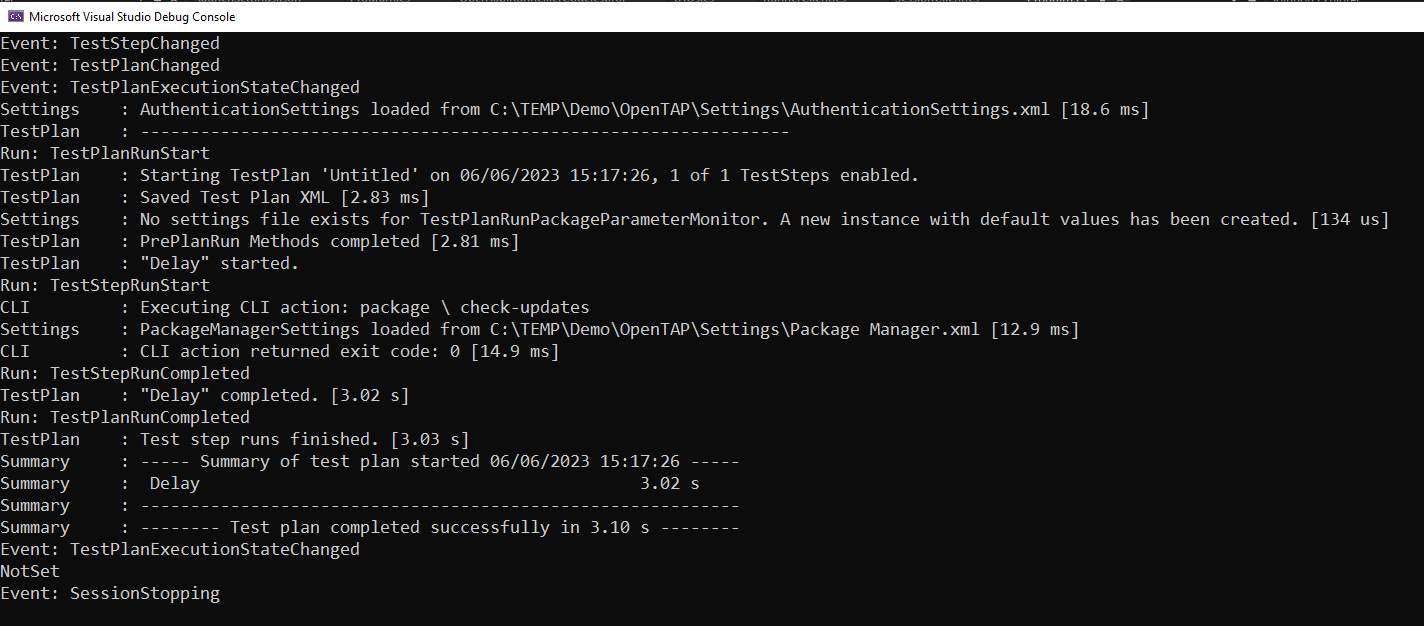
In this example, we use the simple session from the Create and Run Test Plan section above, but with results, logs and events logged.
using System;
using System.Collections.Generic;
using System.Linq;
using System.Threading.Tasks;
using NATS.Client.Core;
using OpenTap.Runner.Client;

await using INatsConnection connection = new NatsConnection(new NatsOpts { Url = RunnerClient.DefaultUrl });
await connection.ConnectAsync();
RunnerClient runner = new RunnerClient(connection);
SessionClient newSession = await runner.StartSessionAsync();

newSession.ConnectSessionLogs(LogHandler);
Task LogHandler(LogList? list)
{
    if (list?.Logs != null)
        foreach (var log in list.Logs)
            Console.WriteLine($"{log.Source,-12}: {log.Message}");
    return Task.CompletedTask;
}

newSession.ConnectSessionResults(ResultHandler, RunHandler);
Task ResultHandler(Result? result)
{
    if (result != null)
        Console.WriteLine($"Result: {result.Status}");
    return Task.CompletedTask;
}
Task RunHandler(TestRun? run)
{
    if (run != null)
        Console.WriteLine($"Run: {run.Status}");
    return Task.CompletedTask;
}

newSession.ConnectSessionEvents(EventHandler);
Task EventHandler(SessionEvent? evt)
{
    if (evt != null)
        Console.WriteLine($"Event: {evt.GetType().Name}");
    return Task.CompletedTask;
}

List<TestStepType> types = await newSession.GetStepTypesAsync();
TestPlan plan = await newSession.GetTestPlanAsync(null);
plan.ChildTestSteps.Clear();
plan.ChildTestSteps.Add(types.First(step => step.TypeName.Contains("Delay")));
plan = await newSession.SetTestPlanAsync(plan);

Settings delayStepSettings = await newSession.GetSettingsAsync(plan.ChildTestSteps[0].Id);
if (delayStepSettings.FirstOrDefault(s => s.PropertyName == "DelaySecs") is TextBoxControl textBox)
    textBox.StringValue = "3 s";
delayStepSettings = await newSession.SetSettingsAsync(plan.ChildTestSteps[0].Id, delayStepSettings);

RunStatus status = await newSession.RunTestPlanAsync(new List<Parameter>());
while (status.SessionState != SessionState.Idle)
{
    await Task.Delay(1000);
    status = await newSession.GetStatusAsync();
}

Console.WriteLine(status.Verdict);

await runner.ShutdownSessionAsync(newSession.Id);
This code should produce the following output, where events, runs and results are prepended with “Event: “, “Run: “, and “Result: “.
Working with ComponentSettings
using System;
using System.Collections.Generic;
using System.Linq;
using System.Threading.Tasks;
using NATS.Client.Core;
using OpenTap.Runner.Client;

await using INatsConnection connection = new NatsConnection(new NatsOpts { Url = RunnerClient.DefaultUrl });
await connection.ConnectAsync();
RunnerClient runner = new RunnerClient(connection);
SessionClient newSession = await runner.StartSessionAsync();

try
{
    List<ComponentSettingsIdentifier> componentSettings = await newSession.GetComponentSettingsOverviewAsync();
    foreach (var componentSetting in componentSettings)
        Console.WriteLine($"Component Setting: {componentSetting.Name} ({componentSetting.GroupName})");

    // Outputs:
    // Component Setting: DUTs(Bench)
    // Component Setting: Engine(-)
    // Component Setting: Instruments(Bench)
    // Component Setting: Connections(Bench)
    // Component Setting: Results(-)
    // Component Setting: Editor(-)
    // Component Setting: Cloud Drive(-)

    ComponentSettingsIdentifier instrumentIdentifier = componentSettings
        .First(s => s.Name == "Instruments" && s.GroupName == "Bench");

    List<ListItemType> instrumentTypes = await newSession.GetComponentSettingsListAvailableTypesAsync(
        instrumentIdentifier.GroupName,
        instrumentIdentifier.Name);
    foreach (var instrumentType in instrumentTypes)
        Console.WriteLine($"Instrument Type: {string.Join("/", instrumentType.TypeDisplay.Group)}/{instrumentType.TypeDisplay.Name}");

    // Outputs:
    // Instrument Type: / Generic SCPI Instrument
    // Instrument Type: Demo / Battery Test / Power Analyzer
    // Instrument Type: Demo / Battery Test / Temperature Chamber
    // Instrument Type: Demo / Results And Timing/ Timing Instrument

    ComponentSettingsBase instruments = await newSession.GetComponentSettingsAsync(
        instrumentIdentifier.GroupName,
        instrumentIdentifier.Name);
    if (instruments is ComponentSettingsList list)
        foreach (var instrument in list.Items)
            Console.WriteLine($"Instrument: {instrument.Name}");

    // Outputs:
    // Instrument: SCPI
    // Instrument: PSU
    // Instrument: TEMP

    ComponentSettingsBase updated = await newSession.AddComponentSettingsListItemAsync(
        instrumentIdentifier.GroupName,
        instrumentIdentifier.Name,
        instrumentTypes.First(type => type.TypeDisplay.Name == "Power Analyzer").TypeName);

    if (updated is ComponentSettingsList listWithNewItem)
    {
        foreach (var instrument in listWithNewItem.Items)
            Console.WriteLine($"Instrument: {instrument.Name}");

        // Outputs:
        // Instrument: SCPI
        // Instrument: PSU
        // Instrument: TEMP
        // Instrument: PSU (1)

        foreach (var setting in listWithNewItem.Items[^1].Settings)
        {
            Console.WriteLine($"Setting: {setting.Display.Name}");
            if (setting is TextBoxControl textBox)
                Console.WriteLine(textBox.StringValue);
        }
    }

    // Outputs:
    // Setting: Cell Size Factor
    // 0.005
}
finally
{
    await runner.ShutdownSessionAsync(newSession.Id);
}
Default Endpoints
Default endpoints are endpoints that affect each other. They are:
- SetDefaultImage: Sets a default image in the Runner environment. The image includes essential packages.
- GetDefaultImage: Retrieves the currently set default image.
- SetDefaultSettings: Applies default settings for the Runner. Settings might have various package dependencies.
- GetDefaultSettings: Retrieves the current settings from the Runner.
- StartDefaultSession: Starts a session using the default settings and image.
- StartDefaultSessionOverrideImage: Begins a session with an overridden image for specific use cases.
A Session’s plugin configuration depends on:
- The dependencies of the TestPlan.
- The dependencies of the Settings.
- The packages defined in a “default image”.
- Optionally, the packages defined in an “image override”.
The following example demonstrates how to use the RunnerClient for managing test plans in a Runner session.
public static async Task DefaultTestPlanShowcaseAsync(RunnerClient runnerClient)
{
    Image baseImage = new()
    {
        Packages = new List<PackageSpecifier>
        {
            new PackageSpecifier { Name = "Runner", Version = "1.7.0" }
        },
        Repositories = new List<string>
        {
            "https://packages.opentap.io"
        }
    };
    await runnerClient.Default.SetImageAsync(baseImage); // Apply the base image configuration

    RepositoryPackageReference settingsPackageReference = new()
    {
        Repository = "https://test-automation.pw.keysight.com/api/packages",
        Path = "/users/dennis.rasmussen@keysight.com/BatterySettings.TapPackage",
        Version = "0.2.0"
    };
    await runnerClient.Default.SetSettingsAsync(settingsPackageReference); // Apply settings package

    RepositoryPackageReference testPlanReference = new()
    {
        Repository = "https://test-automation.pw.keysight.com/api/packages",
        Path = "/users/dennis.rasmussen@keysight.com/BatteryPlan.TapPlan",
        Version = "0.1.0-Draft.5"
    };

    SessionClient session = await runnerClient.Default.StartSessionAsync(testPlanReference);

    try
    {
        RunStatus status = await session.RunTestPlanAsync(new List<Parameter>());
        while (status.SessionState != SessionState.Idle)
        {
            await Task.Delay(1000);
            status = await session.GetStatusAsync();
        }

        Console.WriteLine($"Verdict: {status.Verdict}");
    }
    finally
    {
        await session.ShutdownAsync();
        await runnerClient.ShutdownSessionAsync(session.Id);
    }
}
Copy, paste, undo, and redo test steps
using System;
using System.Collections.Generic;
using System.Linq;
using System.Threading.Tasks;
using NATS.Client.Core;
using OpenTap.Runner.Client;

await using INatsConnection connection = new NatsConnection(new NatsOpts { Url = RunnerClient.DefaultUrl });
await connection.ConnectAsync();
RunnerClient runner = new RunnerClient(connection);

SessionClient session = await runner.StartSessionAsync();

try
{
    List<TestStepType> stepTypes = await session.GetStepTypesAsync();
    TestStepType delay = stepTypes.First(step => step.TypeName == "OpenTap.Plugins.BasicSteps.DelayStep");

    TestPlan plan = await session.GetTestPlanAsync(null);
    plan.ChildTestSteps.Clear();
    plan = await session.SetTestPlanAsync(plan);

    plan.ChildTestSteps.Add(delay);
    plan = await session.SetTestPlanAsync(plan);
    Guid firstStepId = plan.ChildTestSteps[0].Id;

    plan.ChildTestSteps.Add(delay);
    plan = await session.SetTestPlanAsync(plan);
    Guid targetStepId = plan.ChildTestSteps[1].Id;

    string clipboard = await session.CopyStepsAsync(new HashSet<Guid> { firstStepId });
    await session.PasteStepsAsync(targetStepId, clipboard);

    await session.TestPlanUndoAsync(); // removes the pasted copy
    await session.TestPlanRedoAsync(); // reapplies the paste
}
finally
{
    await session.ShutdownAsync();
    await runner.ShutdownSessionAsync(session.Id);
}
Working with UserInputs
using System;
using System.Collections.Generic;
using System.Linq;
using System.Threading;
using System.Threading.Tasks;
using NATS.Client.Core;
using OpenTap.Runner.Client;

await using INatsConnection connection = new NatsConnection(new NatsOpts { Url = RunnerClient.DefaultUrl });
await connection.ConnectAsync();
RunnerClient runner = new RunnerClient(connection);
SessionClient session = await runner.StartSessionAsync();

try
{
    // Used to wait for the test plan to finish executing
    var readyEvent = new ManualResetEventSlim(false);
    bool planStarted = false;

    // Subscribe to session events to handle user input requests
    session.ConnectSessionEvents(async eve =>
    {
        if (eve == null)
            return;

        Console.WriteLine($"Event: {eve.GetType().Name}");

        // When a test step (e.g. DialogStep) requires operator input,
        // the session raises a UserInputRequestedEvent
        if (eve is UserInputRequestedEvent userInputRequest)
        {
            // Retrieve the full Interaction model for this request
            Interaction interaction = await session.GetUserInputAsync(userInputRequest.RequestId);
            Console.WriteLine($"UserInput requested: {interaction.Title}");

            // Find the visible ButtonsControl in the interaction settings
            if (interaction.Settings.OfType<ButtonsControl>().FirstOrDefault(s => s.VisualStatus.IsVisible) is
                ButtonsControl buttons)
            {
                // Select the first button and invoke it
                buttons.SelectedIndex = 0;
                buttons.InvokeMethod = true;

                // Submit the response — the session resumes execution
                await session.SetUserInputAsync(interaction);
            }
        }

        // Signal when the session returns to Idle after the plan has started
        if (eve is SessionStateChangedEvent executionChange)
        {
            if (executionChange.RunStatus.SessionState == SessionState.Executing)
                planStarted = true;
            if (planStarted && executionChange.RunStatus.SessionState == SessionState.Idle)
                readyEvent.Set();
        }
    });

    // Build a test plan with a DialogStep that will trigger a user input
    List<TestStepType> stepTypes = await session.GetStepTypesAsync();
    TestPlan plan = await session.GetTestPlanAsync(null);
    plan.ChildTestSteps.Add(stepTypes.First(step => step.TypeName.Contains("Dialog")));
    plan = await session.SetTestPlanAsync(plan);

    // Run the test plan — execution blocks until the DialogStep's user input is answered
    await session.RunTestPlanAsync(new List<Parameter>());

    // Wait for the session to return to Idle
    if (!readyEvent.Wait(TimeSpan.FromSeconds(30)))
        Console.WriteLine("Test plan did not finish within 30 seconds.");

    RunStatus status = await session.GetStatusAsync();
    Console.WriteLine($"Verdict: {status.Verdict}");
}
finally
{
    await session.ShutdownAsync();
    await runner.ShutdownSessionAsync(session.Id);
}
User inputs are raised by test steps (such as DialogStep) that require operator interaction during execution. When a step requests input, the session publishes a UserInputRequestedEvent containing a RequestId. Use GetUserInputAsync with this ID to retrieve the full Interaction model.
The Interaction contains a Title, Modal flag, Timeout, and Settings. The settings collection uses the same control types as step settings — TextBoxControl, ButtonsControl, and others — so the same patterns for reading and modifying controls apply here. While the session is waiting for a response, its state is WaitingForUserInput.
To submit a response, set InvokeMethod = true on a ButtonsControl (optionally choosing a button via SelectedIndex) and call SetUserInputAsync. The session resumes execution after the input is answered.
Debugging: Breakpoints, pause, and jump-to-step
using System;
using System.Collections.Generic;
using System.Linq;
using System.Threading;
using System.Threading.Tasks;
using NATS.Client.Core;
using OpenTap.Runner.Client;

await using INatsConnection connection = new NatsConnection(new NatsOpts { Url = RunnerClient.DefaultUrl });
await connection.ConnectAsync();
RunnerClient runner = new RunnerClient(connection);
SessionClient session = await runner.StartSessionAsync();

try
{
    // Track break events so we know which step the session stopped on
    var breakHit = new ManualResetEventSlim(false);
    Guid breakStepId = Guid.Empty;
    bool planStarted = false;
    var planFinished = new ManualResetEventSlim(false);

    session.ConnectSessionEvents(evt =>
    {
        if (evt is BreakEvent breakEvent)
        {
            breakStepId = breakEvent.StepId;
            breakHit.Set();
        }
        if (evt is SessionStateChangedEvent stateChange)
        {
            if (stateChange.RunStatus.SessionState == SessionState.Executing)
                planStarted = true;
            if (planStarted && stateChange.RunStatus.SessionState == SessionState.Idle)
                planFinished.Set();
        }
        return Task.CompletedTask;
    });

    // Build a plan with three Delay steps
    List<TestStepType> types = await session.GetStepTypesAsync();
    TestStepType delayType = types.First(step => step.TypeName.Contains("Delay"));

    TestPlan plan = await session.GetTestPlanAsync(null);
    plan.ChildTestSteps.Clear();
    plan.ChildTestSteps.Add(delayType);
    plan.ChildTestSteps.Add(delayType);
    plan.ChildTestSteps.Add(delayType);
    plan = await session.SetTestPlanAsync(plan);

    Guid step0 = plan.ChildTestSteps[0].Id;
    Guid step1 = plan.ChildTestSteps[1].Id;
    Guid step2 = plan.ChildTestSteps[2].Id;

    // Set each delay to 0.5 seconds
    foreach (Guid stepId in new[] { step0, step1, step2 })
    {
        Settings s = await session.GetSettingsAsync(stepId);
        if (s.FirstOrDefault(x => x.PropertyName == "DelaySecs") is TextBoxControl tb)
            tb.StringValue = "0.5 s";
        await session.SetSettingsAsync(stepId, s);
    }

    // --- Set breakpoints on the first two steps ---
    await session.SetBreakpointsAsync(new BreakPoints { TestSteps = new List<Guid> { step0, step1 } });

    BreakPoints currentBp = await session.GetBreakpointsAsync();
    Console.WriteLine($"Breakpoints set on {currentBp.TestSteps.Count} steps");

    // Run the plan — it will break on step0
    await session.RunTestPlanAsync(new List<Parameter>());
    breakHit.Wait(TimeSpan.FromSeconds(10));
    Console.WriteLine($"Broke on step: {(breakStepId == step0 ? "step0" : breakStepId.ToString())}");

    // --- Resume execution — it will break on step1 ---
    breakHit.Reset();
    await session.RunTestPlanAsync(new List<Parameter>());
    breakHit.Wait(TimeSpan.FromSeconds(10));
    Console.WriteLine($"Broke on step: {(breakStepId == step1 ? "step1" : breakStepId.ToString())}");

    // --- Use SetPauseNext to single-step to the next step ---
    // SetPauseNext resumes execution and breaks on the very next step
    breakHit.Reset();
    await session.SetPauseNextAsync();
    breakHit.Wait(TimeSpan.FromSeconds(10));
    Console.WriteLine($"PauseNext broke on step: {(breakStepId == step2 ? "step2" : breakStepId.ToString())}");

    // --- Jump back to step0 while in Breaking state ---
    // Clear breakpoints first so step0 doesn't trigger another break
    await session.SetBreakpointsAsync(new BreakPoints { TestSteps = new List<Guid>() });
    await session.SetJumpToStepAsync(step0);

    // --- Abort the run ---
    await session.AbortTestPlanAsync();

    planFinished.Wait(TimeSpan.FromSeconds(10));
    RunStatus status = await session.GetStatusAsync();
    Console.WriteLine($"Final verdict: {status.Verdict}");
}
finally
{
    await session.ShutdownAsync();
    await runner.ShutdownSessionAsync(session.Id);
}
Breakpoints pause execution just before a step runs. Set them with SetBreakpointsAsync by passing a BreakPoints object containing the target step IDs. When a breakpoint triggers, the session enters the Breaking state and publishes a BreakEvent with the StepId that caused the break.
While in Breaking state you can:
- Resume — call
RunTestPlanAsyncto continue execution until the next breakpoint or completion. - Step — call
SetPauseNextAsyncto resume and break on the very next step regardless of breakpoints. - Jump — call
SetJumpToStepAsyncto redirect execution to a different step. This only works while in theBreakingstate. - Abort — call
AbortTestPlanAsyncto cancel the run entirely.
Clear all breakpoints by passing an empty list to SetBreakpointsAsync.
Session watchdog configuration
using System;
using System.Collections.Generic;
using System.Threading.Tasks;
using NATS.Client.Core;
using OpenTap.Runner.Client;

await using INatsConnection connection = new NatsConnection(new NatsOpts { Url = RunnerClient.DefaultUrl });
await connection.ConnectAsync();
RunnerClient runner = new RunnerClient(connection);
SessionClient session = await runner.StartSessionAsync();

try
{
    // Read the current watchdog configuration
    WatchDog watchdog = await session.GetWatchDogAsync();
    Console.WriteLine($"Current timeout: {watchdog.TerminationTimeout}s, inactive: {watchdog.InactiveSeconds}s");

    // Set the watchdog to terminate the session after 120 seconds of inactivity
    watchdog.TerminationTimeout = 120;
    watchdog = await session.SetWatchDogAsync(watchdog);
    Console.WriteLine($"Updated timeout: {watchdog.TerminationTimeout}s");

    // InactiveSeconds only counts while the session is Idle and
    // resets whenever a NATS request is received. After a brief wait
    // the counter reflects the time since the last API call.
    await Task.Delay(3000);
    watchdog = await session.GetWatchDogAsync();
    Console.WriteLine($"After 3s idle: {watchdog.InactiveSeconds:F1}s inactive");

    // Disable the watchdog by setting TerminationTimeout to 0
    watchdog.TerminationTimeout = 0;
    watchdog = await session.SetWatchDogAsync(watchdog);
    Console.WriteLine($"Watchdog disabled (timeout={watchdog.TerminationTimeout})");
}
finally
{
    await session.ShutdownAsync();
    await runner.ShutdownSessionAsync(session.Id);
}
The session watchdog monitors idle time and terminates unattended sessions. InactiveSeconds tracks how long the session has been idle — it only increments when the session state is Idle and resets whenever a NATS request is received or a test plan runs.
Set TerminationTimeout to the maximum number of idle seconds before the session is automatically shut down. Setting it to 0 disables the watchdog entirely.
Test plan validation errors
using System;
using System.Collections.Generic;
using System.Linq;
using System.Threading.Tasks;
using NATS.Client.Core;
using OpenTap.Runner.Client;

await using INatsConnection connection = new NatsConnection(new NatsOpts { Url = RunnerClient.DefaultUrl });
await connection.ConnectAsync();
RunnerClient runner = new RunnerClient(connection);
SessionClient session = await runner.StartSessionAsync();

try
{
    // Start with a valid plan — no validation errors expected
    List<TestStepType> types = await session.GetStepTypesAsync();
    TestPlan plan = await session.GetTestPlanAsync(null);
    plan.ChildTestSteps.Clear();
    plan.ChildTestSteps.Add(types.First(step => step.TypeName.Contains("Delay")));
    plan = await session.SetTestPlanAsync(plan);

    TestPlanValidationErrors errors = await session.GetValidationErrorsAsync();
    Console.WriteLine($"Validation errors (valid plan): {errors.Count}");

    // Disable the step — disabled steps are excluded from validation
    Guid delayStepId = plan.ChildTestSteps[0].Id;
    Settings settings = await session.GetSettingsAsync(delayStepId);
    if (settings.FirstOrDefault(s => s.Display.Name == "Enabled") is CheckBoxControl enabledBox)
        enabledBox.BoolValue = false;
    await session.SetSettingsAsync(delayStepId, settings);

    errors = await session.GetValidationErrorsAsync();
    Console.WriteLine($"Validation errors (disabled step): {errors.Count}");

    // Print any validation errors found
    foreach (TestStepValidationError stepError in errors)
    {
        Console.WriteLine($"  Step {stepError.StepId}:");
        foreach (ValidationError ve in stepError.ValidationErrors)
            Console.WriteLine($"    {ve.PropertyName}: {ve.Error}");
    }
}
finally
{
    await session.ShutdownAsync();
    await runner.ShutdownSessionAsync(session.Id);
}
GetValidationErrorsAsync returns a TestPlanValidationErrors collection containing one TestStepValidationError per step that has issues. Each entry has a StepId (string GUID) and a list of ValidationError objects with PropertyName and Error message.
Only enabled steps are validated — disabling a step removes it from the validation results. This is useful for temporarily bypassing steps with missing resource dependencies during plan development.
Runner status and health monitoring
using System;
using System.Collections.Generic;
using System.Threading.Tasks;
using NATS.Client.Core;
using OpenTap.Runner.Client;

await using INatsConnection connection = new NatsConnection(new NatsOpts { Url = RunnerClient.DefaultUrl });
await connection.ConnectAsync();
RunnerClient runner = new RunnerClient(connection);

// --- Runner-level status ---
RunnerStatus status = await runner.GetStatusAsync();
Console.WriteLine($"Runner version:   {status.Version}");
Console.WriteLine($"Hostname:         {status.Hostname}");
Console.WriteLine($"IP address:       {status.IpAddress}");
Console.WriteLine($"Running as service: {status.RunningAsService}");
Console.WriteLine($"Running in container: {status.RunningInContainer}");

// NATS connection info
if (status.RemoteConnection is RemoteConnection rc)
{
    Console.WriteLine($"NATS endpoint:    {rc.Endpoint}");
    Console.WriteLine($"NATS connected:   {rc.Connected}");
    Console.WriteLine($"NATS RTT:         {rc.Rtt}");
}

// Storage and stream health
if (status.StreamInfo is StreamInfoStatus si)
{
    Console.WriteLine($"Runs max bytes:   {si.RunsMaxBytes}");
    Console.WriteLine($"Runs usage:       {si.RunsUsage}");
    Console.WriteLine($"Disk free:        {si.DiskFree}");
}

// --- Active sessions ---
List<Session> sessions = await runner.GetSessionsAsync();
Console.WriteLine($"\nActive sessions: {sessions.Count}");
foreach (Session s in sessions)
{
    Console.WriteLine($"  {s.Id} — State: {s.SessionState}, StartedBy: {s.StartedBy}");
    foreach (var kv in s.Metadata)
        Console.WriteLine($"    {kv.Key}: {kv.Value}");
}
GetStatusAsync on the RunnerClient returns a RunnerStatus with version, hostname, IP address, and flags indicating whether the Runner is running as a service or in a container. It also includes RemoteConnection (NATS connectivity) and StreamInfoStatus (JetStream storage usage and free disk space) for health monitoring.
GetSessionsAsync lists all active sessions with their state, the user who started them, and any attached metadata. This is useful for building dashboards or monitoring tools that need to track Runner utilization.
Moving and deleting test steps
using System;
using System.Collections.Generic;
using System.Linq;
using System.Threading.Tasks;
using NATS.Client.Core;
using OpenTap.Runner.Client;

await using INatsConnection connection = new NatsConnection(new NatsOpts { Url = RunnerClient.DefaultUrl });
await connection.ConnectAsync();
RunnerClient runner = new RunnerClient(connection);
SessionClient session = await runner.StartSessionAsync();

try
{
    List<TestStepType> types = await session.GetStepTypesAsync();
    TestStepType delayType = types.First(step => step.TypeName.Contains("Delay"));
    TestStepType repeatType = types.First(step => step.TypeName.Contains("RepeatStep"));

    // Build a plan: [Delay A, Delay B, Repeat C]
    TestPlan plan = await session.GetTestPlanAsync(null);
    plan.ChildTestSteps.Clear();
    plan.ChildTestSteps.Add(delayType);
    plan.ChildTestSteps.Add(delayType);
    plan.ChildTestSteps.Add(repeatType);
    plan = await session.SetTestPlanAsync(plan);

    Guid stepA = plan.ChildTestSteps[0].Id;
    Guid stepB = plan.ChildTestSteps[1].Id;
    Guid stepC = plan.ChildTestSteps[2].Id;

    Console.WriteLine("Initial order:");
    plan = await session.GetTestPlanAsync(null);
    foreach (var step in plan.ChildTestSteps)
        Console.WriteLine($"  {step.TypeName}  {step.Id}");

    // --- Reorder: move A and B after C → [C, A, B] ---
    await session.MoveStepsAsync(new HashSet<Guid> { stepA, stepB }, stepC);
    plan = await session.GetTestPlanAsync(null);
    Console.WriteLine("\nAfter MoveSteps (A,B after C):");
    foreach (var step in plan.ChildTestSteps)
        Console.WriteLine($"  {step.TypeName}  {step.Id}");

    // --- Nest: move A and B as children of C ---
    await session.MoveStepsAsChildrenAsync(new HashSet<Guid> { stepA, stepB }, stepC);
    plan = await session.GetTestPlanAsync(null);
    Console.WriteLine("\nAfter MoveStepsAsChildren (A,B into C):");
    Console.WriteLine($"  Root steps: {plan.ChildTestSteps.Count}");
    Console.WriteLine($"  Children of C: {plan.ChildTestSteps[0].ChildTestSteps.Count}");

    // --- Delete step B ---
    await session.DeleteStepsAsync(new HashSet<Guid> { stepB });
    plan = await session.GetTestPlanAsync(null);
    Console.WriteLine("\nAfter DeleteSteps (B):");
    Console.WriteLine($"  Root steps: {plan.ChildTestSteps.Count}");
    Console.WriteLine($"  Children of C: {plan.ChildTestSteps[0].ChildTestSteps.Count}");
}
finally
{
    await session.ShutdownAsync();
    await runner.ShutdownSessionAsync(session.Id);
}
Three operations are available for reorganising steps in a test plan:
MoveStepsAsync(stepIds, targetStepId)— Moves the specified steps so they appear immediately after the target step at the same nesting level. This is a reorder operation.MoveStepsAsChildrenAsync(stepIds, targetStepId)— Moves the specified steps so they become children of the target step. The target must support child steps (e.g.RepeatStep,SequenceStep).DeleteStepsAsync(stepIds)— Removes the specified steps from the plan entirely.
All three accept a HashSet<Guid> of step IDs. Moving a step to itself throws an ArgumentException, and moving a parent into one of its own descendants throws an InvalidOperationException.
Querying and searching session logs
using System;
using System.Collections.Generic;
using System.Linq;
using System.Threading.Tasks;
using NATS.Client.Core;
using OpenTap.Runner.Client;

await using INatsConnection connection = new NatsConnection(new NatsOpts { Url = RunnerClient.DefaultUrl });
await connection.ConnectAsync();
RunnerClient runner = new RunnerClient(connection);
SessionClient session = await runner.StartSessionAsync();

try
{
    // Run a short plan to generate some log entries
    List<TestStepType> types = await session.GetStepTypesAsync();
    TestPlan plan = await session.GetTestPlanAsync(null);
    plan.ChildTestSteps.Clear();
    plan.ChildTestSteps.Add(types.First(step => step.TypeName.Contains("Delay")));
    plan = await session.SetTestPlanAsync(plan);

    Settings s = await session.GetSettingsAsync(plan.ChildTestSteps[0].Id);
    if (s.FirstOrDefault(x => x.PropertyName == "DelaySecs") is TextBoxControl tb)
        tb.StringValue = "1 s";
    await session.SetSettingsAsync(plan.ChildTestSteps[0].Id, s);

    RunStatus status = await session.RunTestPlanAsync(new List<Parameter>());
    while (status.SessionState != SessionState.Idle)
    {
        await Task.Delay(500);
        status = await session.GetStatusAsync();
    }

    // --- Discover available log levels ---
    Dictionary<int, string> levels = await session.LogLevelsAsync();
    Console.WriteLine("Log levels:");
    foreach (var kv in levels)
        Console.WriteLine($"  {kv.Key}: {kv.Value}");

    // --- Discover log sources ---
    List<string> sources = await session.SessionLogSourcesAsync();
    Console.WriteLine($"\nLog sources: {string.Join(", ", sources)}");

    // --- Get per-level log counts ---
    Dictionary<int, int> counts = await session.SessionLogCountsAsync();
    Console.WriteLine("\nLog counts by level:");
    foreach (var kv in counts)
        Console.WriteLine($"  {(levels.TryGetValue(kv.Key, out string? name) ? name : kv.Key.ToString())}: {kv.Value}");

    // --- Fetch paginated log entries ---
    List<int> allLevels = levels.Keys.ToList();
    LogList? logs = await session.GetSessionLogsAsync(
        level: allLevels,
        excludedSource: new List<string>(),
        filterText: "",
        offset: 0,
        limit: 20
    );

    if (logs != null)
    {
        Console.WriteLine($"\nFirst page: {logs.Logs.Count} entries (offset={logs.Offset}, filtered={logs.FilteredCount})");
        foreach (LogEntry entry in logs.Logs.Take(5))
            Console.WriteLine($"  [{entry.Source}] {entry.Message}");
    }

    // --- Search logs for a keyword ---
    List<int> matchIndexes = await session.SessionLogSearchAsync(
        level: allLevels,
        excludedSource: new List<string>(),
        filterText: "",
        searchText: "Delay"
    );
    Console.WriteLine($"\nSearch hits for 'Delay': {matchIndexes.Count} matching entries");
}
finally
{
    await session.ShutdownAsync();
    await runner.ShutdownSessionAsync(session.Id);
}
Session logs can be queried historically using several complementary APIs:
LogLevelsAsync— Returns aDictionary<int, string>mapping numeric level IDs to names (e.g.10 → Debug,20 → Information,30 → Warning,40 → Error).SessionLogSourcesAsync— Returns the list of source names that have emitted log entries in the current session.SessionLogCountsAsync— Returns per-level entry counts asDictionary<int, int>.GetSessionLogsAsync— Fetches a page of log entries filtered by level, excluded sources, and filter text. The returnedLogListincludes the entries, the currentOffset,FilteredCount, andTotalCountper level.SessionLogSearchAsync— Searches log entries matching the filters and returns a list of matching entry indexes. These indexes correspond to positions in the filtered log sequence.
The LogEntry model contains Source, Message, Level (numeric), Timestamp (Unix epoch ticks), and DurationNS.
Future code examples:
- Load from and save to Repository